Lukita Brush Help
English

For kids 2 to 6

The AR brushing mirror that makes toddlers ask to brush.

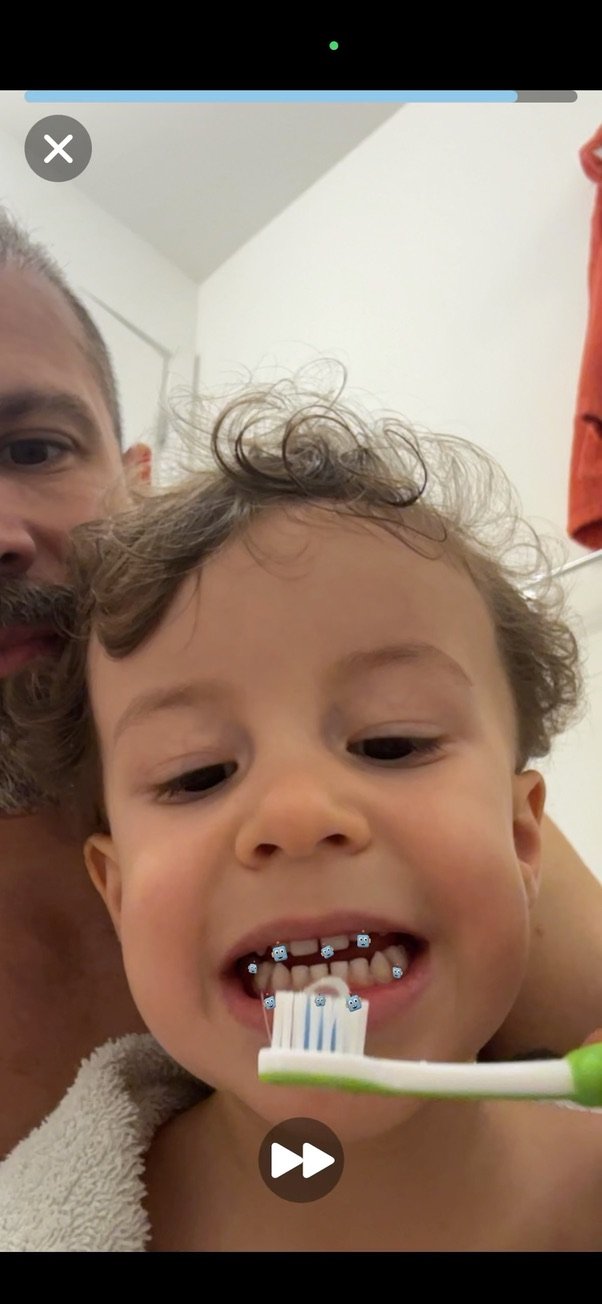
With augmented reality (AR), funny little creatures appear on your child's own teeth in the front camera and vanish as they brush. No AI, and nothing leaves the phone.

Download on the App Store

Free for the first 8 brushes, then one unlock. No ads, no account. Your child uses it only while brushing.
Works on iPhone and iPad Pro with Face ID, iOS 16 or later.

Augmented reality, made for little mouths

  • On your child's own teeth

    Little 3D creatures sit across the teeth, live in the mirror.

  • Open wide to find them

    They only show where the mouth is open. When the lips close, they hide.

  • They move with the mouth

    When your child turns, talks or giggles, they stay with the mouth.

Why I built it

Every night, I lost the same fight to my 2‑year‑old son.

At bedtime, with his pajamas on and the toothbrush loaded, I knelt on the bathroom floor. My son pressed his lips together so tight they disappeared. He was not negotiating.

We tried books about brushing, and a toy hippo with teeth to brush. We brushed our teeth next to him so he could copy us. We even showed him pictures of rotten teeth. We really tried everything, and it made our evenings hard and frustrating.

Nothing worked.

Then one day I saw a little kid with cavities, and I panicked: my son had just gone a few days without brushing. I had to find something that worked. What if he could see the microbes on his own teeth and brush them away himself? So I built it.

The first time a microbe showed up on his tooth, he opened his mouth wide and went after it.

Lectures never got my son to brush. A microbe to chase did.

Leonardo, his dad

How it works

  1. Prop up the phone

    Set it at face level, about an arm's length away. The front camera becomes a mirror.

  2. Pick a funny little monster

    Your child picks one of eight, like a hungry monster, a tiny pirate or a baby dragon.

  3. Brush them away

    Tiny creatures sit on the teeth and shrink away as your child brushes. Every brush counts: after 3, 6 and 10 brushes, your child unlocks a party hat, a silly mustache and super shades to dress up the monsters.

Eight little monsters

Your child can switch to another monster any time.

No AI, and nothing leaves the phone

During a session, the camera image and face data stay on the phone. The app reads them live and never saves, uploads or shares them. It has no AI model and calls no AI service. Apple's ARKit, built into iOS, follows the face, and the app measures movement around the mouth.

Read the privacy policy

Questions

Before you download

Is it free?

The first 8 brushing sessions are free. After that, one in-app purchase unlocks Lukita Brush for good, and Family Sharing shares it with your family.

Which devices does it run on?

It requires an iPhone with Face ID and iOS 16 or later. The iPhone SE has no Face ID and can't run the live AR. On iPad, it needs an iPad Pro with Face ID. It does not run on Android, Mac or Apple Vision Pro.

Will it keep my child on the phone?

No. A session lasts 30 seconds to 4 minutes, while your child brushes. The app has no ads or videos to keep them on the phone afterwards.

Does the app record my child?

No. The app reads the camera image and face data live on the phone and never saves or sends them.

Does the app use AI?

No. The app has no AI model and calls no AI service. It connects to the internet only through Apple's App Store, to buy or restore the unlock. Apple's ARKit, which is part of iOS, follows your child's face on the phone, and the app measures movement around the mouth.

Is this a dental device?

No. It's a funny AR mirror for brushing time, and it doesn't check how well teeth are cleaned. Follow your dentist's advice.

After you download

The creatures don't appear.

Check that Lukita Brush can use the camera in Settings › Lukita Brush › Camera. Use good light and hold the phone at face level, about an arm's length away.

How do grown-ups reach the settings?

Tap the sliders button at the top of the app's main screen. While brushing, hold anywhere on the mirror for 1.5 seconds to pause or finish.

How do I get a refund?

Apple handles all payments. Request a refund at reportaproblem.apple.com

Contact

support@lukitabrush.com

We usually answer within two business days.

No more bedtime brushing fights.

Download on the App Store

Free for the first 8 brushes, then one unlock. No ads, no account. Your child uses it only while brushing.
Works on iPhone and iPad Pro with Face ID, iOS 16 or later.